
Can you recover the text behind the box?
Use three small PDFs to compare an original, a dangerous visual overlay, and a flattened result. Every name, contact detail, account number, and credential-like string is fictional and safe for testing.
Download the experiment files
Save all three files locally. The first is your source, the second demonstrates a common failure, and the third demonstrates the expected flattened structure.
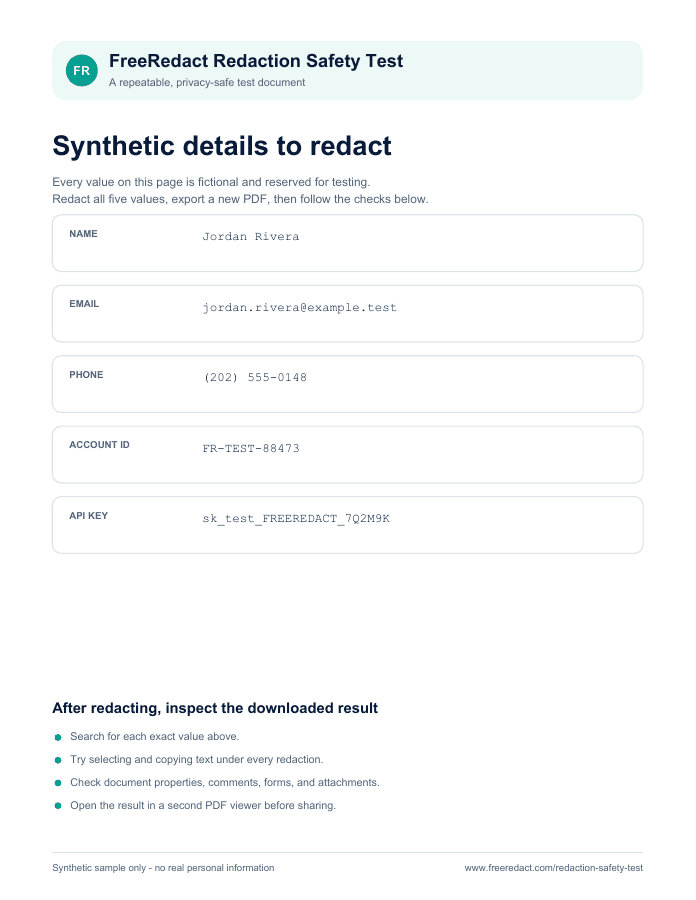
Download the synthetic source PDF
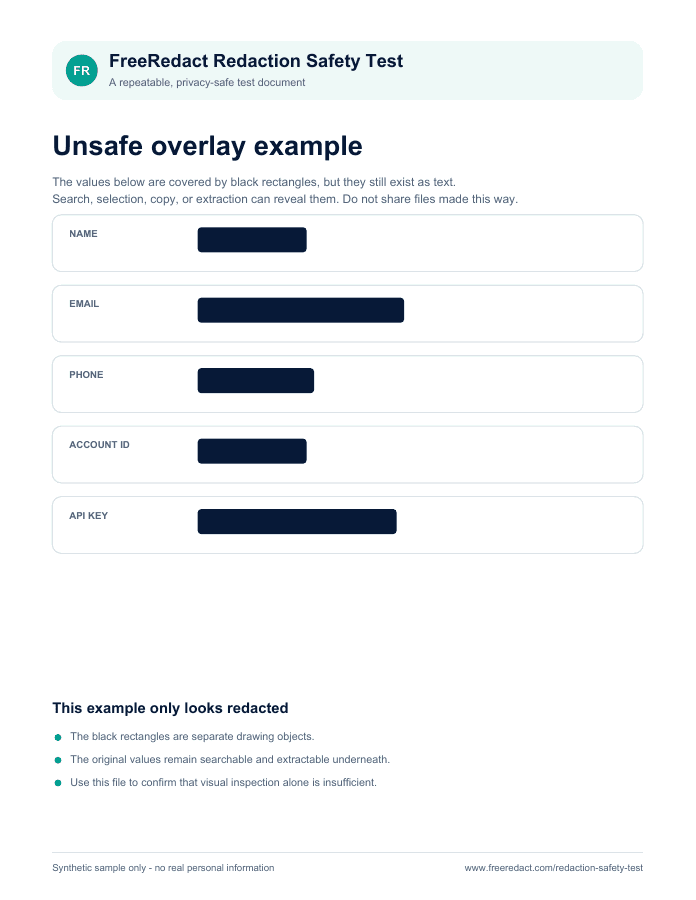
Download the unsafe overlay example
What these files demonstrate
Synthetic source: the five fictional values are visible, searchable, selectable, and copyable. This is the control file.
Unsafe overlay: black boxes make the five values look covered, but the original text remains in the PDF. Searching or copying can still reveal it. The example is intentionally unsafe and must not be treated as a sanitized document.
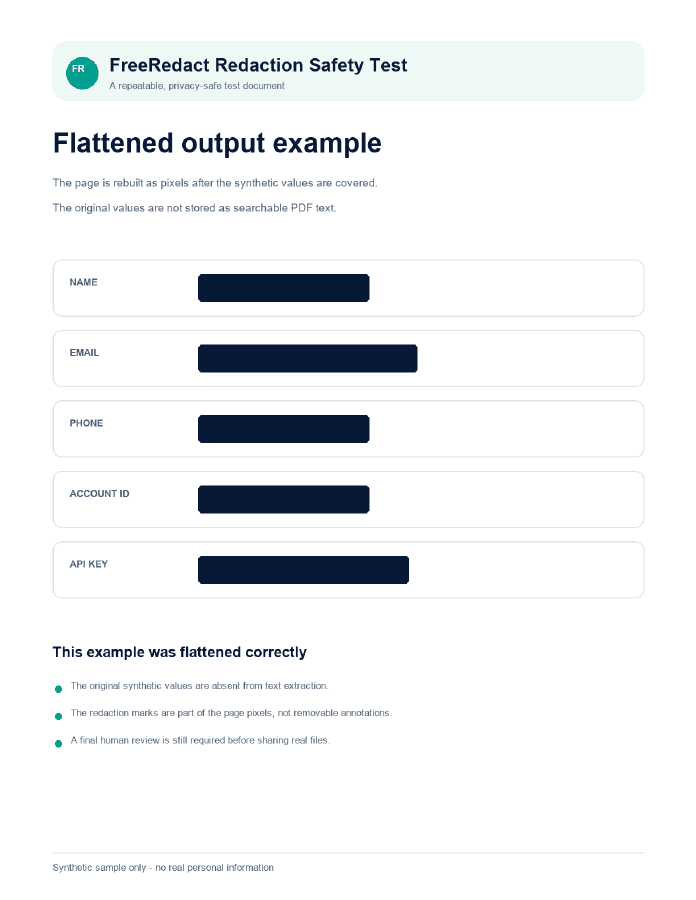
Prebuilt flattened demonstration: the page is rebuilt as an image. The five values are covered in the page pixels, and the PDF contains no original extractable text or redaction annotations. This file was prepared separately from the editor to demonstrate the structure; it is not an export from the current production editor.
Recorded results for these three downloads
Checked with Python 3.12.14 and pypdf 6.10.0 on Windows 11. This was an offline text-extraction and document-structure check. No browser or production editor version was exercised by this check.
| File | Values recovered | Fragments recovered | Extracted characters |
|---|---|---|---|
| Synthetic source | 5 of 5 | 4 of 4 | 719 |
| Unsafe overlay | 5 of 5 | 4 of 4 | 717 |
| Prebuilt flattened demonstration | 0 of 5 | 0 of 4 | 0 |
All three files have one page, zero annotations, zero form fields, and zero attachments. The unsafe overlay still exposes every test value despite having no annotations. The prebuilt flattened file retains generic PDF-generator properties, including its producer and dates; image-based output does not mean every metadata field is empty.
What this does not establish: automatic detection coverage, production-editor export behavior, browser search or copy results, OCR recovery, or safety for another document. The experiments below let you test those ordinary viewer actions yourself; record them separately.
File fingerprints and a repeatable extraction check
Use the downloaded files with the Python pypdf library locally. For each file, join the text returned by page.extract_text() across all pages, then look for the five exact values and four fragments listed below. Inspect annotations, fields, and attachments separately. These SHA-256 hashes identify the files checked:
- Synthetic source:
402dc5c8aa737ab54874f6d7277fa41e49818d4eba0b3e8965bdf24d1a597a11 - Unsafe overlay:
898a8423c95818af0368af6f1d56825f4b25176cca4fd9dc395832fe83528545 - Prebuilt flattened demonstration:
69347ba1ad5de892d21d0803d2a2398a6895d92b1ed4c100d3e1cf7325aa1a29
The five safe test values
Copy these exact strings into the PDF viewer’s search box during the experiment:
Jordan Riverajordan.rivera@example.test(202) 555-0148FR-TEST-88473sk_test_FREEREDACT_7Q2M9K
The email uses the reserved .test domain, the phone number is in a fictional-use range, and the token is clearly marked as a test value. None is a working identity or credential. Do not substitute real information.
Experiment 1: establish the control
Open freeredact-redaction-safety-test.pdf in a full PDF viewer.
Search for each of the five exact values. All five should be found.
Drag across the page, copy the text, and paste it into a temporary plain-text document. All five should appear.
Record the page count and inspect document properties and annotation or attachment panels so you know what the source contains.
Expected result: five searchable and extractable values. This proves your viewer and test method can recover the source text.
Experiment 2: expose the unsafe overlay
Open unsafe-overlay-example.pdf. Confirm that black boxes appear to cover the five values.
Search for every test value again. A visual box is not enough: the values remain discoverable.
Select across the boxes, copy, and paste into a temporary text document.
Check the comments or annotations panel. Even if it is empty, searching and copying still prove that the visual cover did not remove the source text.
Expected result: all five values remain extractable despite looking redacted. This is why drawing a shape over PDF text is not a complete sanitization workflow.
Experiment 3: inspect the flattened example
Open flattened-safe-example.pdf and confirm the same five areas are visibly covered.
Search for every full value and distinctive fragments such as
88473,example.test,0148, and7Q2M9K.Try to select or copy text across the page. The page should behave as an image rather than selectable source text.
Check comments, annotations, forms, layers, and attachment panels. The test file should contain no redaction annotation that can be moved aside.
Open the file in a second PDF viewer and repeat the highest-value search.
Expected result: zero searchable or extractable test values and no removable redaction annotations. The tradeoff is that legitimate text is no longer searchable, selectable, or tagged either.
Run the same test through FreeRedact
Open the private editor and choose the synthetic source PDF.
Review automatic suggestions, then manually cover any of the five values the scan did not find. The test is also a reminder that detection and export are separate: a safe export cannot remove a value you never marked.
Download the sanitized PDF and close the editor. Perform all recovery attempts against the downloaded file.
Search for the five exact values and fragments, try selection and copy, inspect document panels and properties, then open the file in another viewer.
If a test value remains visible or extractable after you approved its redaction, do not use that export for sensitive sharing. Keep the synthetic file and report the browser, steps, expected result, and actual result to hello@freeredact.com. Never attach a real sensitive file.
Pass criteria
- Every intended redaction is fully opaque at high zoom.
- Searching for full values and distinctive fragments returns no result.
- Selection and copy do not recover the covered text.
- No comment, annotation, form, layer, or attachment exposes the value.
- Document properties and the filename reveal no private source information.
- A second viewer produces the same result.
Passing this controlled test shows that the tested export removed the tested values through ordinary recovery paths. It does not prove that an automatic scan will find every sensitive detail in a different file, that surrounding context is anonymous, or that the result meets a particular legal or compliance rule.
Use the test safely
- Use only the supplied fictional values or other clearly synthetic data.
- Do not upload real customer files or credentials to a third-party inspection service.
- Delete temporary pasted text when your test is finished.
- Keep sensitive originals separate from shareable exports and use neutral filenames.
- Revoke or rotate a real credential if it was ever disclosed; redacting a later copy is not enough.
Understand the testing boundary
Read how FreeRedact creates product claims, chooses synthetic examples, cites sources, documents tradeoffs, and handles corrections.
Read the methodology